
티스토리 뷰
웹 어플리케이션에서 사용자에게 푸시 알림을 보내는 기능을 구현하는 방법을 정리해보겠습니다.
개요
Firebase Cloud Messaging(FCM)은 웹, IOS, Android 앱에서 푸시 알림을 보낼 수 있을 크로스 플랫폼 메시징 솔루션 입니다.
Firebase 프로젝트 설정
- Firebase Console 에 접속
- 새 프로젝트 생성 또는 기존 프로젝트 선택
- 앱 웹 추가 (</> 아이콘 클릭)
- SDK 설정 정보 및 VAPID KEY 발급
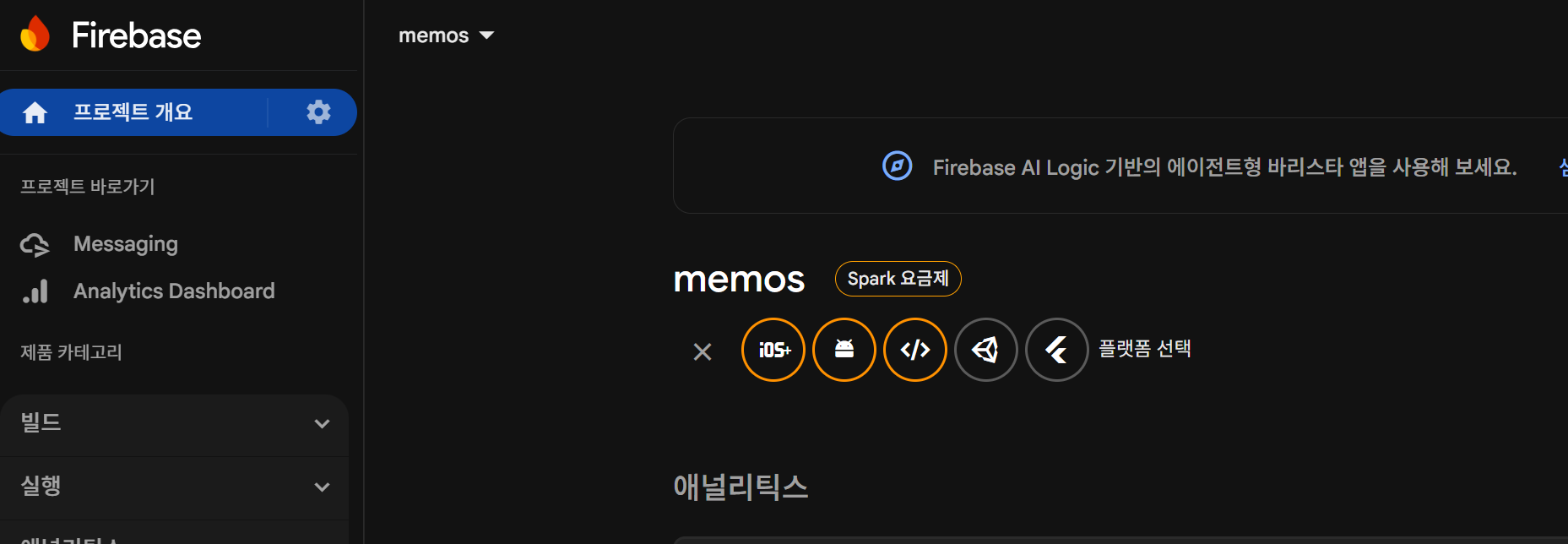
저는 간단하게 memos 라는 프로젝트에 push라는 이름으로 </> 라는 플랫폼으로 생성했습니다.
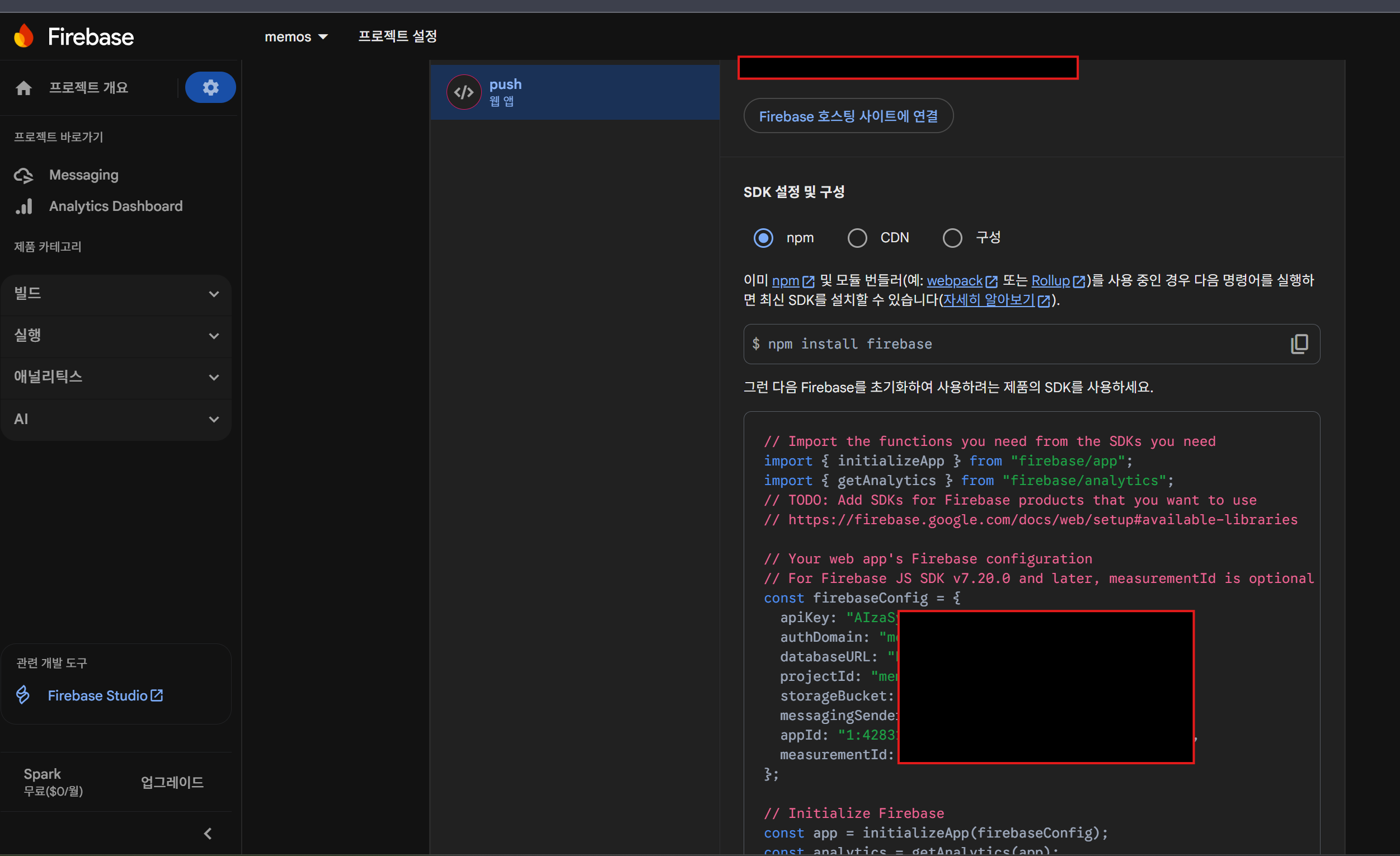
좌측상단에 톱니바퀴 > 프로젝트 설정
그러면 가이드대로 npm으로 firebase 설치해주고 firebaseConfig는 저장해줍니다.
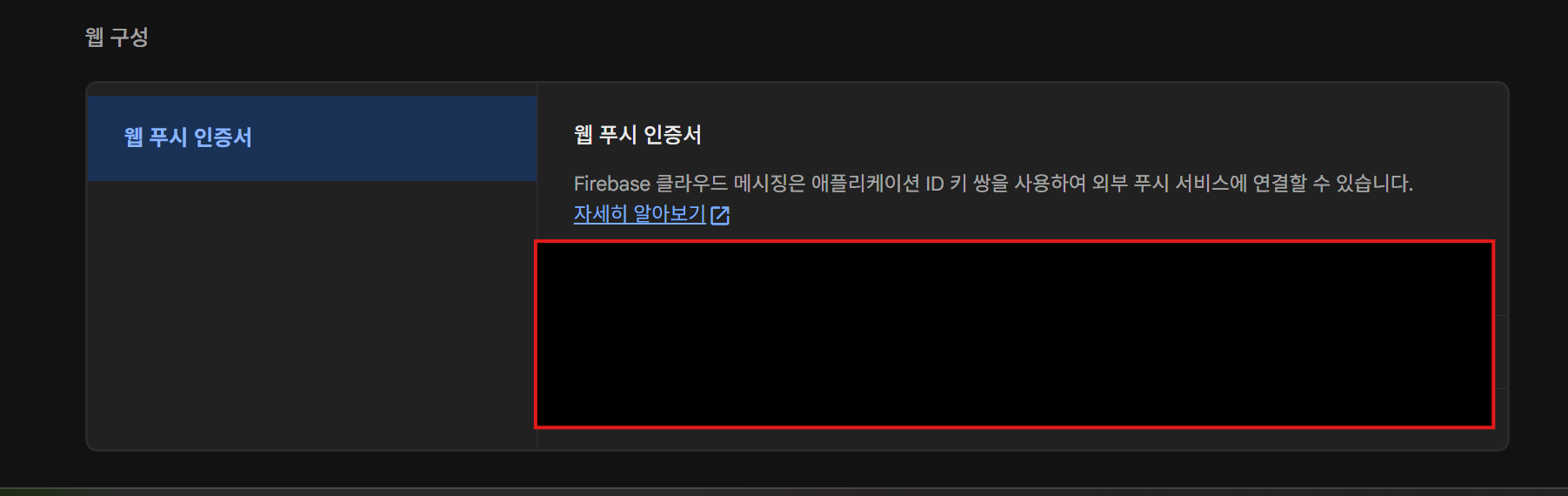
그리고 위로 올려서 "클라우드 메시징" 탭에서 VAPID KEY를 발급해줍시다.
프론트엔드 구성
- Firebase 앱 초기화
- Firebase Messaging 모듈 구현
- Hook 만들기
- Service Worker 작성
- 테스트 페이지 구성
Firebase 앱 초기화
// src/lib/firebase.ts
import { initializeApp } from 'firebase/app'

const firebaseConfig = {
  apiKey: process.env.NEXT_PUBLIC_FIREBASE_API_KEY,
  authDomain: process.env.NEXT_PUBLIC_FIREBASE_AUTH_DOMAIN,
  projectId: process.env.NEXT_PUBLIC_FIREBASE_PROJECT_ID,
  storageBucket: process.env.NEXT_PUBLIC_FIREBASE_STORAGE_BUCKET,
  messagingSenderId: process.env.NEXT_PUBLIC_FIREBASE_MESSAGING_SENDER_ID,
  appId: process.env.NEXT_PUBLIC_FIREBASE_APPID,
}

export const firebaseApp = initializeApp(firebaseConfig)
Firebase Messaging 모듈 구현
// src/lib/firebase-messaging.ts
'use client'

import { getMessaging, getToken, onMessage, type Messaging } from 'firebase/messaging'
import { firebaseApp } from './firebase'

let messaging: Messaging | null = null
let swRegistrationPromise: Promise<ServiceWorkerRegistration | null> | null = null

// Firebase Messaging 초기화
export const initMessaging = (): Messaging | null => {
  if (typeof window === 'undefined') {
    return null
  }

  if (messaging) {
    return messaging
  }

  try {
    messaging = getMessaging(firebaseApp)
    return messaging
  } catch (error) {
    console.error('Firebase Messaging 초기화 실패:', error)
    return null
  }
}

// Service Worker 등록 (페이지 로드 완료 후)
const waitForWindowLoad = async () => {
  if (typeof window === 'undefined') return
  if (document.readyState === 'complete') return

  await new Promise<void>((resolve) => {
    window.addEventListener('load', () => resolve(), { once: true })
  })
}

export const registerServiceWorker = async (): Promise<ServiceWorkerRegistration | null> => {
  if (typeof window === 'undefined' || !('serviceWorker' in navigator)) {
    return null
  }

  if (!swRegistrationPromise) {
    swRegistrationPromise = (async () => {
      await waitForWindowLoad()
      try {
        const registration = await navigator.serviceWorker.register('/firebase-messaging-sw.js')
        return registration
      } catch (error) {
        console.error('Service Worker 등록 실패:', error)
        const existing = await navigator.serviceWorker.getRegistration('/firebase-messaging-sw.js')
        return existing ?? null
      }
    })()
  }

  return swRegistrationPromise
}

// 알림 권한 요청
export const requestNotificationPermission = async (): Promise<NotificationPermission> => {
  if (typeof window === 'undefined' || !('Notification' in window)) {
    return 'denied'
  }

  if (Notification.permission === 'granted') {
    return 'granted'
  }

  if (Notification.permission === 'denied') {
    return 'denied'
  }

  // 사용자 제스처(버튼 클릭 등) 안에서 호출되어야 함
  const permission = await Notification.requestPermission()
  return permission
}

// FCM 토큰 발급
export const requestForToken = async (): Promise<string | null> => {
  if (typeof window === 'undefined') {
    return null
  }

  const vapidKey = process.env.NEXT_PUBLIC_FIREBASE_VAPID_KEY ?? ''
  if (!vapidKey) {
    console.error('VAPID 키가 설정되지 않았습니다.')
    return null
  }

  // 알림 권한 확인
  const permission = await requestNotificationPermission()
  if (permission !== 'granted') {
    console.error('알림 권한이 허용되지 않았습니다.')
    return null
  }

  const messagingInstance = initMessaging()
  if (!messagingInstance) {
    return null
  }

  const registration = await registerServiceWorker()
  if (!registration) {
    console.error('Service Worker를 등록할 수 없습니다.')
    return null
  }

  try {
    const token = await getToken(messagingInstance, {
      vapidKey,
      serviceWorkerRegistration: registration,
    })

    if (token) {
      console.log('FCM 토큰 발급 성공:', token)
      return token
    }

    return null
  } catch (error) {
    console.error('FCM 토큰 발급 실패:', error)
    return null
  }
}

// 포그라운드 메시지 수신 리스너
export const onMessageListener = () =>
  new Promise((resolve) => {
    const messagingInstance = initMessaging()
    if (!messagingInstance) {
      resolve(null)
      return
    }

    onMessage(messagingInstance, (payload) => {
      console.log('포그라운드 메시지 수신:', payload)
      resolve(payload)
    })
  })
React Hook 구현
// src/hooks/common/use-web-push.ts
'use client'

import { useCallback, useEffect, useState } from 'react'
import { onMessageListener, requestForToken, requestNotificationPermission } from '@/lib/firebase-messaging'

export const useWebPush = () => {
  const [token, setToken] = useState<string | null>(null)
  const [permission, setPermission] = useState<NotificationPermission>('default')
  const [loading, setLoading] = useState(false)

  const requestToken = useCallback(async () => {
    setLoading(true)

    const permissionResult = await requestNotificationPermission()
    setPermission(permissionResult)

    if (permissionResult !== 'granted') {
      console.warn('알림 권한이 허용되지 않았습니다.')
      setLoading(false)
      return null
    }

    const issuedToken = await requestForToken()
    setToken(issuedToken)
    setLoading(false)
    return issuedToken
  }, [])

  useEffect(() => {
    if (token) {
      onMessageListener().then((payload) => {
        if (payload) {
          console.log('포그라운드 메시지 수신:', payload)
        }
      })
    }
  }, [token])

  return {
    token,
    permission,
    loading,
    refreshToken: requestToken,
  }
}
Service Worker 설정
Service Worker 파일은 반드시 'public' 폴더에 위치해야 하며
루트 경로(/firebase-mnessaging-sw.js)에서 접근이 가능해야 합니다.
/* eslint-disable no-undef */
// Firebase Cloud Messaging Service Worker
importScripts('https://www.gstatic.com/firebasejs/10.14.0/firebase-app-compat.js')
importScripts('https://www.gstatic.com/firebasejs/10.14.0/firebase-messaging-compat.js')

const firebaseConfig = {
  apiKey: 'YOUR_API_KEY',
  authDomain: 'YOUR_AUTH_DOMAIN',
  projectId: 'YOUR_PROJECT_ID',
  storageBucket: 'YOUR_STORAGE_BUCKET',
  messagingSenderId: 'YOUR_MESSAGING_SENDER_ID',
  appId: 'YOUR_APP_ID',
}

const firebaseApp = firebase.initializeApp(firebaseConfig)
const messaging = firebase.messaging()

// 백그라운드 메시지 수신 처리
messaging.onBackgroundMessage(function (payload) {
  const notification = payload.notification

  console.log('[firebase-messaging-sw.js] Received background message ', notification)

  const notificationTitle = notification?.title || payload.data?.title || '알림'
  const notificationOptions = {
    body: notification?.body || payload.data?.body || payload.data?.message || '',
    icon: '/icons/favicon-96x96.png',
    badge: '/icons/favicon-32x32.png',
    data: {
      url: payload.data?.link || payload.fcmOptions?.link || '/',
      ...payload.data,
    },
  }

  self.registration.showNotification(notificationTitle, notificationOptions)
})

// 알림 클릭 이벤트 처리
self.addEventListener('notificationclick', (event) => {
  event.notification.close()
  const urlToOpen = event.notification.data?.url || '/'

  event.waitUntil(
    clients
      .matchAll({ type: 'window', includeUncontrolled: true })
      .then((clientList) => {
        for (const client of clientList) {
          if (client.url === urlToOpen && 'focus' in client) {
            return client.focus()
          }
        }
        if (clients.openWindow) {
          return clients.openWindow(urlToOpen)
        }
        return null
      })
  )
})
서비스 워커는 FCM 웹 푸시에서 필수 요구사항이며, 백그라운드로 메시지 수신을 하여 브라우저가
꺼져있어도 독립적으로 실행되어 메시지를 수신하고 알림을 표시하기 위해서 입니다.
포그라운드: 페이지가 열려있을 때 onMessage() 리스너로 메시지 처리
백그라운드: 페이지가 닫혀있을 때 onBackgroundMessage() 리스너로 메시지 처리테스트 페이지 작성
'use client'

import { useCallback, useEffect, useMemo, useState } from 'react'

import Box from '@mui/material/Box'
import Button from '@mui/material/Button'
import Paper from '@mui/material/Paper'
import Stack from '@mui/material/Stack'
import Typography from '@mui/material/Typography'
import Alert from '@mui/material/Alert'
import TextField from '@mui/material/TextField'

import { useWebPush } from '@/hooks/common/use-web-push'

const truncateToken = (token?: string | null) => {
  if (!token) {
    return '토큰이 아직 발급되지 않았습니다.'
  }
  return `${token.slice(0, 30)}...${token.slice(-6)}`
}

const copyToken = async (token: string | null) => {
  if (!token) {
    return
  }
  try {
    await navigator.clipboard.writeText(token)
    console.log('📋 토큰이 클립보드에 복사되었습니다.')
  } catch (error) {
    console.error('토큰 복사에 실패했습니다:', error)
  }
}

export default function WebPushTestPage() {
  const { token, permission, loading, refreshToken } = useWebPush()
  const [pushTitle, setPushTitle] = useState('웹 푸시 테스트')
  const [pushBody, setPushBody] = useState('이것은 테스트 메시지입니다.')
  const [pushLink, setPushLink] = useState('')
  const [targetToken, setTargetToken] = useState('')
  const [sending, setSending] = useState(false)
  const [sendResult, setSendResult] = useState<{ success: boolean; message: string } | null>(null)

  const [endpoint, setEndpoint] = useState(() => {
    const base = process.env.NEXT_PUBLIC_API_URL?.replace(/\/$/, '')
    return base ? `${base}/interface/fcm` : '/interface/fcm'
  })

  useEffect(() => {
    console.log('현재 알림 권한:', permission)
  }, [permission])

  useEffect(() => {
    if (token) {
      console.log('현재 발급된 토큰:', token)
      setTargetToken(token)
    }
  }, [token])

  useEffect(() => {
    if (typeof window !== 'undefined') {
      setPushLink(window.location.origin)
    }
  }, [])

  const sendTestPush = useCallback(async () => {
    if (!targetToken) {
      alert('전송할 대상 토큰이 없습니다.')
      return
    }

    setSending(true)
    setSendResult(null)

    try {
      const response = await fetch(endpoint, {
        method: 'POST',
        headers: {
          'Content-Type': 'application/json',
        },
        body: JSON.stringify({
          title: pushTitle,
          body: pushBody,
          link: pushLink,
          tokens: [{ token: targetToken }],
        }),
      })

      const data = await response.json().catch(() => null)

      if (!response.ok) {
        throw new Error(data?.message || 'FCM 전송 요청이 실패했습니다.')
      }

      const successCount = data?.payload?.successCount ?? 0
      const failureCount = data?.payload?.failureCount ?? 0
      setSendResult({
        success: true,
        message: `전송 완료 - 성공 ${successCount}건 / 실패 ${failureCount}건`,
      })
    } catch (error) {
      console.error('FCM 전송 중 오류:', error)
      setSendResult({
        success: false,
        message: error instanceof Error ? error.message : '알 수 없는 오류가 발생했습니다.',
      })
    } finally {
      setSending(false)
    }
  }, [targetToken, pushTitle, pushBody, pushLink, endpoint])

  return (
    <Box sx={{ p: 4, maxWidth: 960, mx: 'auto', display: 'flex', flexDirection: 'column', gap: 3 }}>
      <Typography variant="h4" fontWeight={700}>
        웹 푸시 테스트
      </Typography>

      <Paper sx={{ p: 3 }} elevation={3}>
        <Stack spacing={2}>
          <Typography variant="subtitle1">1. 권한 상태</Typography>
          <Typography variant="body2">알림 권한: {permission}</Typography>
          <Typography variant="body2">로딩 상태: {loading ? '토큰 발급 중...' : '대기 중'}</Typography>
        </Stack>
      </Paper>

      <Paper sx={{ p: 3 }} elevation={3}>
        <Stack spacing={2}>
          <Typography variant="subtitle1">2. 토큰 정보</Typography>
          <Typography variant="body2">{truncateToken(token)}</Typography>
          <Stack direction="row" spacing={2}>
            <Button variant="contained" onClick={refreshToken} disabled={loading}>
              {loading ? '토큰 요청 중...' : '토큰 다시 요청'}
            </Button>
            <Button variant="outlined" onClick={() => copyToken(token)} disabled={!token}>
              토큰 복사
            </Button>
          </Stack>
        </Stack>
      </Paper>

      <Paper sx={{ p: 3 }} elevation={3}>
        <Stack spacing={2}>
          <Typography variant="subtitle1">3. 실행 로그</Typography>
          <Typography variant="body2" color="text.secondary">
            이 페이지는 접근 즉시 알림 권한을 요청하고 FCM 토큰을 발급합니다. 결과는 브라우저 콘솔에서
            확인할 수 있습니다.
          </Typography>
        </Stack>
      </Paper>

      <Paper sx={{ p: 3 }} elevation={3}>
        <Stack spacing={2}>
          <Typography variant="subtitle1">4. FCM 전송 테스트</Typography>
          <TextField
            label="제목"
            value={pushTitle}
            onChange={(event) => setPushTitle(event.target.value)}
            fullWidth
          />
          <TextField
            label="본문"
            value={pushBody}
            multiline
            minRows={2}
            onChange={(event) => setPushBody(event.target.value)}
            fullWidth
          />
          <TextField
            label="링크"
            value={pushLink}
            onChange={(event) => setPushLink(event.target.value)}
            fullWidth
          />
          <TextField
            label="대상 토큰"
            value={targetToken}
            onChange={(event) => setTargetToken(event.target.value)}
            multiline
            minRows={3}
            fullWidth
          />
          {sendResult && (
            <Alert severity={sendResult.success ? 'success' : 'error'}>{sendResult.message}</Alert>
          )}
          <Stack direction="row" spacing={2}>
            <TextField
              label="호출 엔드포인트"
              value={endpoint}
              onChange={(event) => setEndpoint(event.target.value)}
              fullWidth
            />
            <Button variant="contained" onClick={sendTestPush} disabled={sending}>
              {sending ? '전송 중...' : 'FCM 메시지 전송'}
            </Button>
          </Stack>
        </Stack>
      </Paper>
    </Box>
  )
}
결과
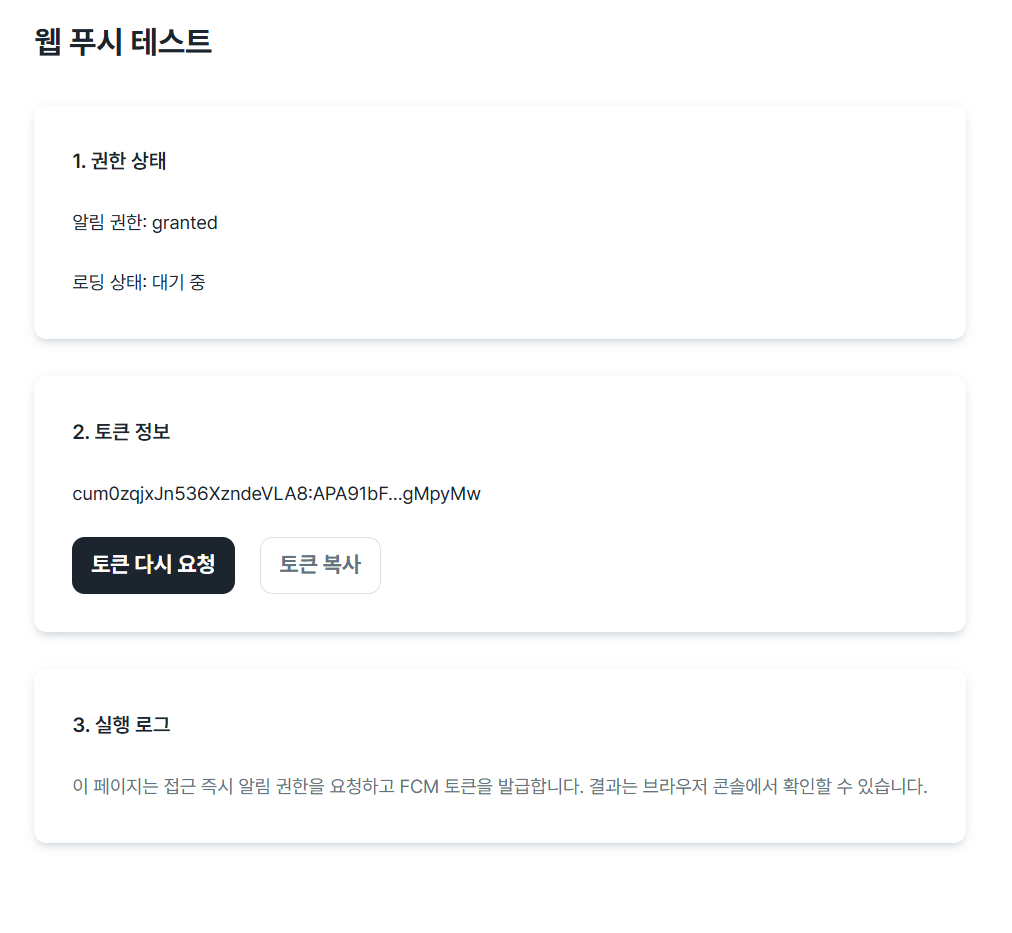
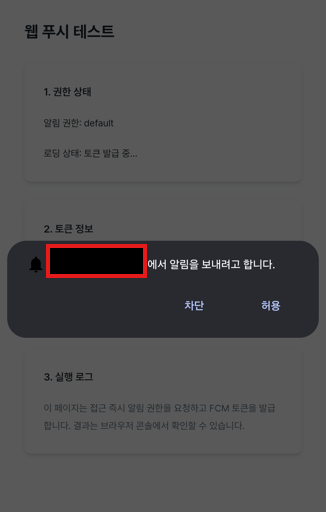
테스트 페이지로 접근 시 권한 관련한 얼럿이 뜨게된다.
토큰정보는 device token으로 타켓팅을 하기위한 key 입니다.
다시 콘솔로 돌아가서 해당 토큰으로 메시지를 보내봅시다.
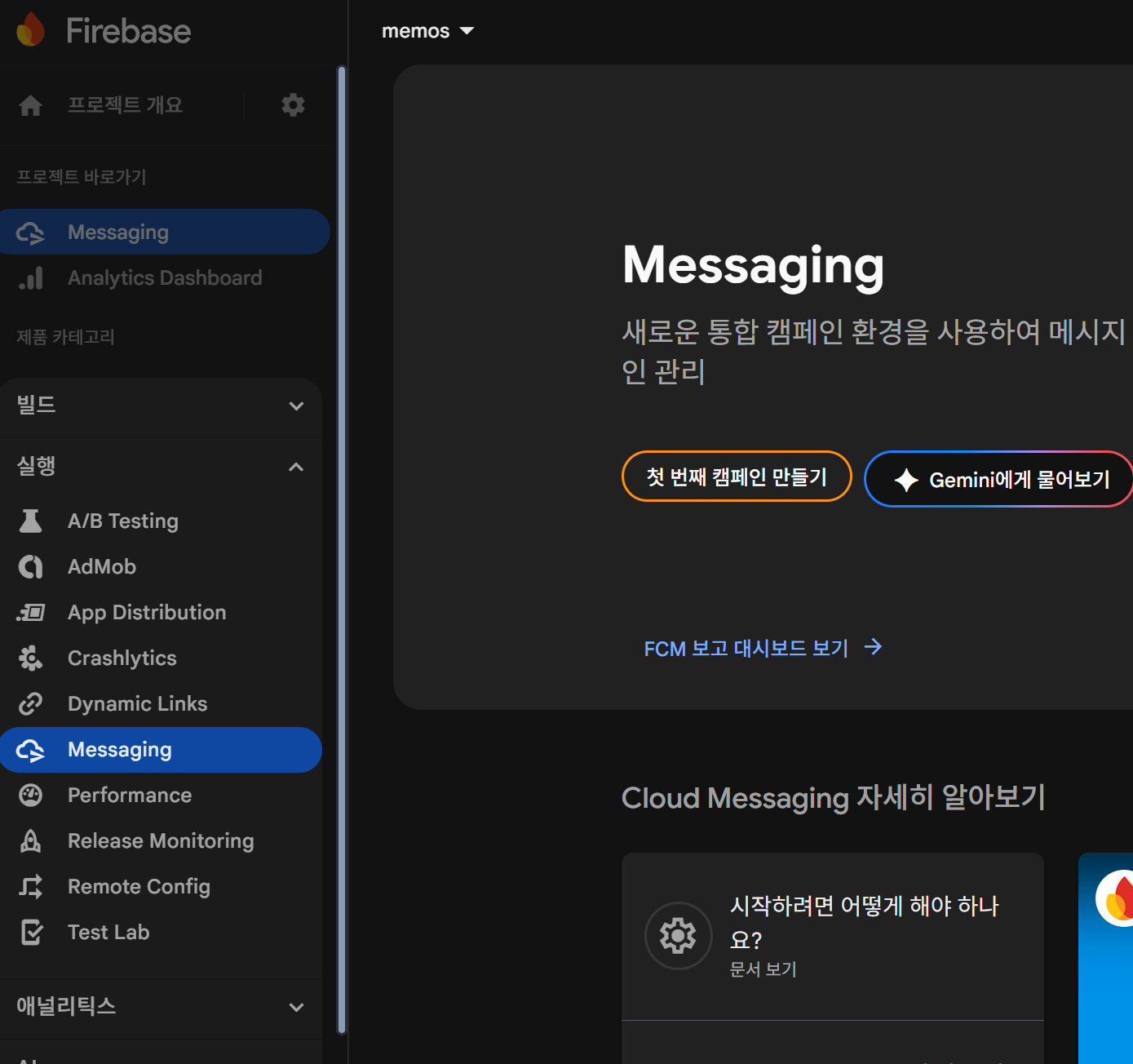
첫 번째 캠페인 만들기를 클릭해서
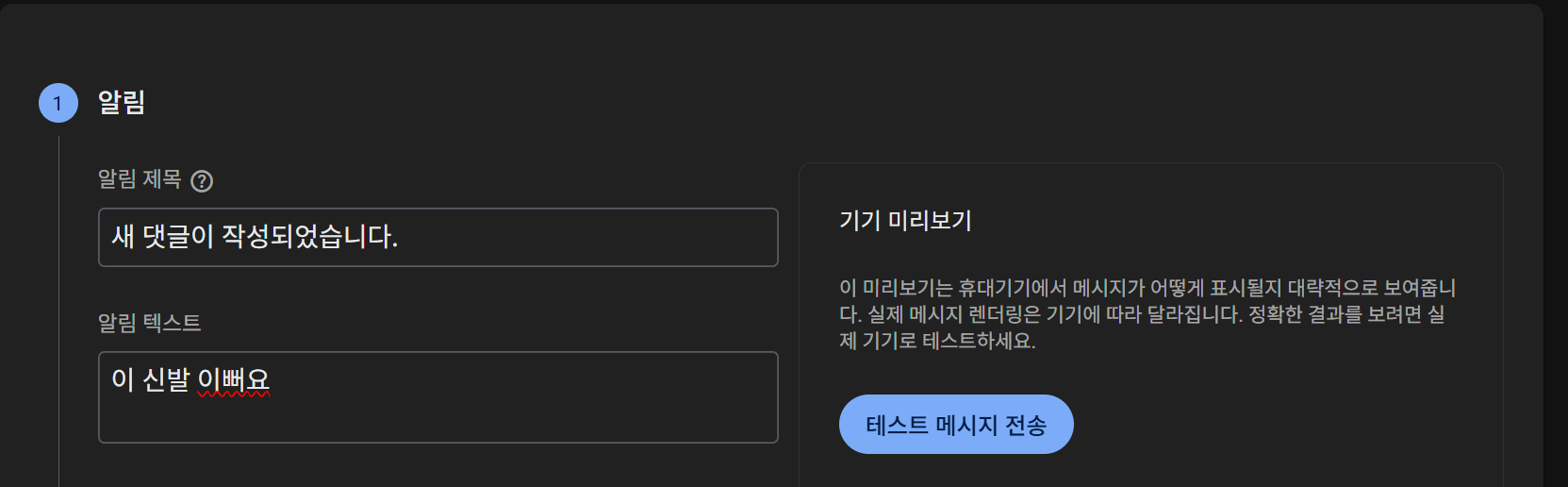
아까 저장한 토큰을 가지고 테스트 메시지 전송 gogo
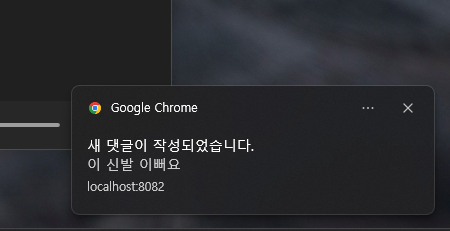
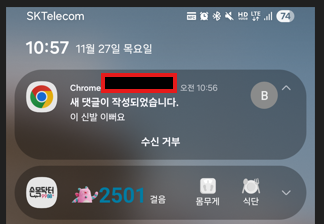
하지만 이슈가 하나 있는데 알림을 차단/허용을 한 번 선택하면 같은 창을 다시 띄우기가 어렵다.
웹이나 안드에서는 권한 재설정이라는 기능으로 on/off가 가능한데 "유저가 그렇게 사용할까?" 라는 관점에서는 미지수다.
error fix
Service Worker 파일이 HTML로 반환되는 경우
Next.js에서 rewrites 설정이 모든 경로를 가로채서 Service Worker 파일도 HTML로 반환되는 문제가 발생할 수 있음
### 해결 방법

`next.config.mjs`에서 다음과 같이 설정합니다:

const nextConfig = {
  // ... 기타 설정

  async headers() {
    return [
      {
        source: '/firebase-messaging-sw.js',
        headers: [
          {
            key: 'Content-Type',
            value: 'application/javascript; charset=utf-8',
          },
          {
            key: 'Service-Worker-Allowed',
            value: '/',
          },
        ],
      },
    ]
  },

  async rewrites() {
    return [
      // ... 기타 rewrites
      {
        source: '/:module*/:path*',
        destination: `/page/:module*/:path*`,
        has: [
          {
            type: 'header',
            key: 'accept',
            value: 'text/html',
          },
        ],
      },
    ]
  },
}
'front-end > React' 카테고리의 다른 글
| 리액트 서버 사이드 렌더링의 이해 (0) | 2019.12.31 |
|---|---|
| 리액트 Context API (0) | 2019.12.15 |
| 리액트 라우터 적용해보기 (0) | 2019.12.13 |
| 리액트 SPA 요점 (0) | 2019.12.11 |
| 리액트 Hook #2 (0) | 2019.12.08 |